
Velocity Executor is the premier free keyless Roblox script executor for Windows PC with 98% UNC score and instant execution. Download now and run any Roblox script seamlessly without delays or key systems.
Latest Version 2.8.5 | Updated: Feb 4, 2026 | Windows 10/11
Velocity Executor Guides
Download Guide
Step-by-step download and install instructions for Velocity v2.8.5 on Windows PC.
API Documentation
Full LuaU API reference — closures, filesystem, HTTP, input simulation, and all globals.
Error Fix Guide
Solutions for every Velocity error — injection failed, DLL missing, crashes, and false positives.
PC Version Guide
Optimised setup for Windows 10 & 11 — best settings, performance tips, system requirements.
iOS Version
Velocity Executor for iPhone & iPad — current status, workaround guide, and upcoming iOS release.
Why Choose Velocity Executor
98% UNC Score
Advanced sUNC technology ensures compatibility with thousands of Roblox scripts including Blox Fruits, Pet Simulator X, and Blade Ball scripts.
Keyless & Free
No annoying key systems or paid subscriptions. Download and start executing scripts immediately without barriers.
Instant Execution
Microsecond response time with optimized script injection. Run complex LuaU scripts without lag or delays.
Byfron Compatible
Updated bypass protocol works seamlessly with latest Roblox anti-cheat system. Auto-updates keep you protected.
Safe & Secure
Tested environment with memory isolation prevents crashes. Minimal detection risk when used responsibly.
User-Friendly UI
Clean interface with script library, tab system, and always-on-top mode. Perfect for beginners and experts.
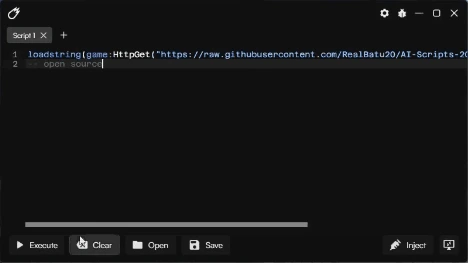
Advanced features including script hub integration, auto-inject, and custom API support
Quick Installation Guide
-
1
Download: Click the download button above to get Velocity.7z file (5.2 MB)
-
2
Extract: Use WinRAR or 7-Zip to extract the archive to a folder on your desktop
-
3
Disable Antivirus: Temporarily disable Windows Defender or antivirus (required for injection)
-
4
Run Executor: Launch Velocity.exe as administrator from the extracted folder
-
5
Open Roblox: Start any Roblox game and wait for it to fully load
-
6
Inject: Click the "Inject" button in Velocity - wait for "Injected Successfully" message
-
7
Execute Scripts: Paste your script into the editor and click "Execute" to run
Note: Use a secondary Roblox account for safety. Velocity works on Windows 10 and Windows 11 (64-bit).
Latest Updates - Changelog
Version 2.8.5
February 4, 2026- Fixed compatibility with Roblox version 2.645.879
- Improved injection speed by 35%
- Added support for new LuaU bytecode format
- Enhanced script analyzer for better error detection
- Fixed crash on Windows 11 24H2 build
Version 2.8.4
January 28, 2026- Updated Byfron bypass mechanism
- Optimized memory allocation for large scripts
- Added script pre-compilation cache
- Fixed UI scaling issues on 4K displays
Version 2.8.3
January 15, 2026- Increased UNC score from 96% to 98%
- Added multi-instance support
- Improved error handling and logging
- New dark theme UI update
Execute powerful scripts in popular Roblox games with one click
LuaU Scripting Documentation
Velocity Executor supports full LuaU syntax with advanced features. LuaU is derived from Lua 5.1 with performance enhancements and modern programming features.
Core LuaU Functions
-- Basic Script Structure
local Players = game:GetService("Players")
local LocalPlayer = Players.LocalPlayer

-- Common Functions
game.Workspace.Gravity = 50  -- Change gravity
LocalPlayer.Character.Humanoid.WalkSpeed = 100  -- Speed boost

-- Advanced: Remote Event Firing
game:GetService("ReplicatedStorage").RemoteEvent:FireServer("argument")
Velocity-Specific Functions
-- Check if Velocity is injected
if is_velocity_closure then
    print("Velocity Executor detected")
end

-- Script Hub Integration
loadstring(game:HttpGet("https://raw.githubusercontent.com/script-hub/main.lua"))()

-- Auto-Execute on Respawn
LocalPlayer.CharacterAdded:Connect(function(character)
    -- Your script here
end)
Supported LuaU Features
- String interpolation:
print(`Player name: {player.Name}`) - Type annotations:
local function add(x: number, y: number): number - Generalized iteration:
for index, value in array do - Continue statement: Skip loop iterations with
continue - Compound assignments:
x += 5instead ofx = x + 5
Troubleshooting Common Issues
Executor won't open or crashes immediately
Solution: Disable Windows Defender real-time protection. Add Velocity folder to exclusions. Install latest Visual C++ Redistributables from Microsoft. Run as administrator.
Injection fails or says "Failed to attach"
Solution: Close all Roblox instances and restart them. Make sure Roblox is fully loaded before injecting. Update Velocity to latest version. Check if antivirus is blocking the process.
Scripts don't execute or throw errors
Solution: Verify script compatibility with current Roblox version. Check script syntax for errors. Some scripts require specific game contexts. Try scripts from verified sources like Pastebin or GitHub.
Roblox crashes after injection
Solution: Update graphics drivers. Lower Roblox graphics settings. Close background applications using too much RAM. Rejoin the game after injecting instead of injecting mid-game.
Getting banned from Roblox
Solution: Always use alt accounts for testing. Avoid obvious exploits in public servers. Don't spam scripts repeatedly. Use private servers when possible. Some games have stronger anti-cheat detection.
Velocity detected as virus
Solution: This is a false positive due to code injection techniques. Download only from official velocity.com.de. Scan with VirusTotal for verification. Add to antivirus whitelist if safe.
System Requirements
- Windows 10 (64-bit) version 1909 or higher
- Windows 11 (all versions supported)
- 4GB RAM minimum (8GB recommended)
- 500MB free disk space
- .NET Framework 4.8 or newer
- DirectX 11 compatible graphics
Popular Script Compatibility
Velocity Executor works flawlessly with these popular Roblox game scripts:
Blox Fruits
Auto-farm, fruit finder, auto-quest, boss teleport scripts
Pet Simulator X
Auto-hatch, coin farm, instant collection scripts
Arsenal
Aimbot, ESP, silent aim, infinite ammo scripts
Blade Ball
Auto-parry, ball speed manipulator scripts
Jailbreak
Auto-rob, teleport, vehicle speed scripts
Adopt Me
Auto-aging, trade scam protection scripts
Murder Mystery 2
ESP, auto-collect coins, role reveal scripts
Tower Defense
Auto-place, wave skip scripts
Frequently Asked Questions
Is Velocity Executor safe to use?
Velocity is tested and safe from malware. However, any script executor carries risk of Roblox account termination. Always use secondary accounts for safety.
Does Velocity require a key system?
No. Velocity is completely keyless and free. Download and use immediately without completing surveys or tasks.
Will this work after Roblox updates?
Velocity updates within 2-4 hours after major Roblox patches. Enable auto-update feature for seamless compatibility.
Can I use Velocity on mobile or Mac?
Velocity is Windows-only currently. Mobile and Mac versions are under development. Use Windows emulation as temporary solution.
What is UNC score and why does it matter?
UNC (Universal Naming Convention) score measures script compatibility. Velocity's 98% UNC means it successfully executes 98% of all public Roblox scripts.
Ready to Execute?
Join thousands of Roblox players using Velocity Executor daily. Free download, instant setup, no keys required.